Are you trying to download a big torrent and not getting the required speed? Maybe you are downloading torrents for the first time, or some settings are out of place.
Because torrents are supposed to give us the fastest download speed, you can download everything without worrying about file integrity. However, a few tips and tricks exist to increase your uTorrent download speed to give you maximum bandwidth.
Today, we discuss some of the hidden tricks I use to increase my torrent download speeds from a 10-30% cap. By default, you will get good speed if you download any torrent with a fair amount of seeds and leechers.
Also Read – Best uTorrent Settings
Steps to Increase Your uTorrent Download Speed
Torrent files with few seeders tend to download at very low speeds. You may have to wait hours to download 1 GB of files. But do not worry; here are some tips to increase your uTorrent download speed.
Step 1:- Launch the uTorrent client on your Computer screen and add your torrent download file.
Step 2:- Go on the “Options” in the upper left second corner of the screen. Click “Preferences,” or you can press CTRL+P to open “Preferences.”
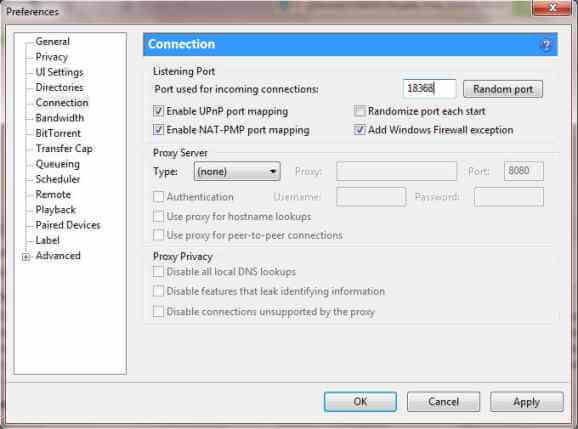
Step 3:- Go to the ‘Connection’ tab and make sure to enable checks, as shown below.
BEST PORTS CHOOSE ANYONE: Try all of them to see which one works best:
- 15987
- 11132
- 18368
- 18318
- 15387
- 18318
- 16391
- 45682
- 53906
Step 4: After that, we will ‘General’ and enable check to append incomplete files and check all pre-allocated files.
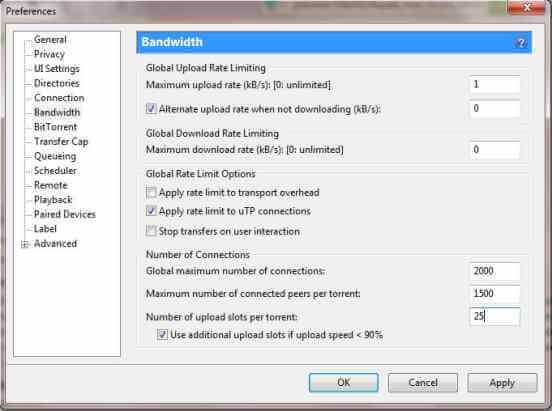
Step 5:- Go on the “Bandwidth” tab and change the maximum range to 100, “the maximum download rate is set Zero.
Change the “Global maximum number of connection” to 2000, change the “maximum number of connected peers per torrent” to 1500.
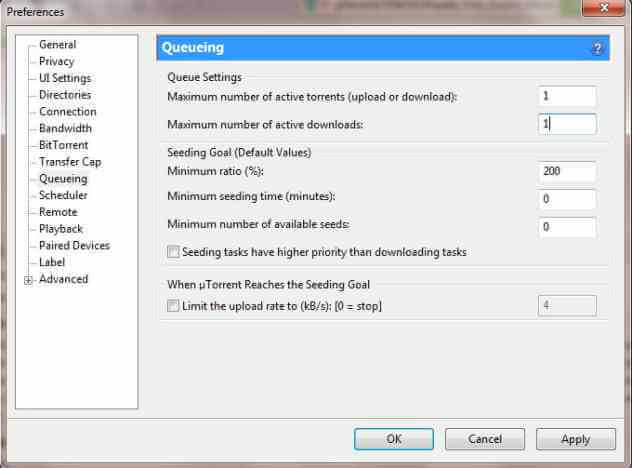
Step 6:- After that, you have to go “Queueing” and make sure the maximum number of active torrents is 1, and the maximum number of downloads is 1.
Step 7:- Go to your Torrent file, right-click, and choose the Force Start option. Double-click on Torrent download and go to “Bandwidth allocation,” and set it to high.
Step 8: Go to “Properties” and select any of the trackers from the list list below.
Trackers List
http://tracker.deluxebits.to:3552/announce udp://coppersurfer.tk:6969/announce


udp://tracker.prq.to/announce udp://tracker.btzoo.eu:80/announce


http://tracker.torrentbox.com:2710/announce


http://tracker.hexagon.cc:2710/announce


http://tracker.torrent.to:2710/announce


http://axxo.sladinki007.net:6500/announce http://www.torrent-downloads.to:2710/announce udp://9.rarbg.com:2710/announce


http://inferno.demonoid.com:3400/announce http://tracker.prq.to/announce


http://tracker.torrenty.org:6969/announce


http://tpb.tracker.thepiratebay.org/announce http://t.ppnow.net:2710/announce


http://tracker.paradise-tracker.com:12000/announce


http://www.torrentvideos.com:6969/announce


http://tracker.sladinki007.net:6500/announce


http://tracker.bitebbs.com:6969/announce


udp://tracker.opentrackr.org:1337/announce


udp://tracker.openbittorrent.com:80 udp://tracker.publicbt.com:80


udp://tracker.istole.it:80 udp://tracker.btzoo.eu:80/announce


http://mpggalaxy.mine.nu:6969/announce


http://www.sumotracker.org/announce http://9.rarbg.com:2710/announce


http://mgtracker.org:2710/announce


udp://tracker.openbittorrent.com:80/announce


http://denis.stalker.h3q.com:6969/announce udp://9.rarbg.me:2710/announce
From Editor’s Desk
Downloading torrent files can be tricky sometimes, as they largely depend on group peering or group sharing.
However, make sure that the torrent you want to download has a good number of leechers and seeds. Then, you will automatically get good speeds without trying so hard. If not, you can always try these tips to increase your uTorrent download speeds easily.
