Did you get tired of writing a long text message or formal writing? Don’t worry; we found ways to convert voice recording into text . We probably all type long type messages to friends or for many official works like preparing letters, content and many more things.
Writing manually is a complex task, and you may also feel bored. Writing long messages also consumes your time, whereas you can do this task quickly and easily. This is where modern voice-to-text engines come to work. These can make your work life much easier by converting your voice into text. This comes in handy when you need to write long paragraphs but are feeling utterly lazy.
There are hundreds of tasks like note preparation, writing emails that you have to do. Sometimes you may also face small font trouble because of typing through the phone, which causes many health issues.
List of Best Ways To Convert Voice Recording To Text:-
These listed apps for converting voice recordings to text messages will help you to overcome all your issues. There are a lot of advantages of converting speech to a text message. Firstly the main advantage is it will save your time and hence efficiency will increase.
Convert Voice Recording To Text
You can also take advantage of more benefits, like increasing mobility, accuracy, and productivity. Converting voice to text messages will help you to correct your typing errors. It also provides the flexibility that you can carry your work anywhere.
By taking all these advantages, you can prepare your task more professionally and simplify your work. So let’s check out these fantastic ways.
1. Transcribe
Transcribe is the best way to convert your voice recording to a text message . It provides you with all the features that you need for converting your voice to a text message. The app is designed for students to prepare notes and for the interviewer to collect information, but anyone can use it.

Transcribe
You will get a straightforward and user-friendly interface that will allow you to access any features easily. The fantastic part of this app is that it automatically corrects your mistakes.
Suppose you forget to add an article in any sentence; then, the app will automatically add that. This app’s accuracy rate is also good; you will probably get the correct output without any mistakes.
Download Transcribe for iOS
2. Happyscribe
If you are looking for an online option where you don’t need to download any software, then it is for you. Happyscribe is a web-based software that allows you to convert voice to text through its website. It’s designed for professionals to enhance their work quality.

Happyscribe
This app’s best feature is speaker identification, which means multiple users can prepare a single file. Suppose there are two members and both have to write one article, so they decided to do half each. So when the speaker changes, it will recognize, or you can also customize that. You can export the files into various formats like Word, HTML, and SRT.
Visit Happyscribe
3. Otter
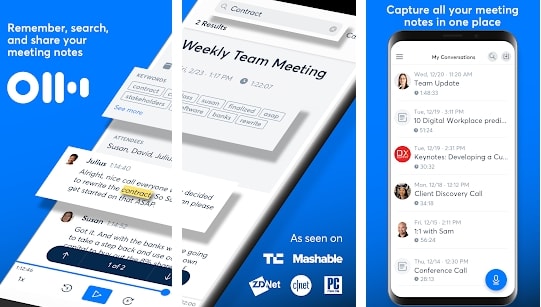
Otter is the solution for work and school life to help you with your difficult tasks. The handy feature of this app is it allows you to upload the local recording from your phone. This app also provides you a content summary, which can assure you that your recorded content is correct.
Otter
Another great feature of this app is that it allows you to create a group where you can share your members’ data. This feature is specially designed for students to create a group and prepare notes from multiple sources. You can also share your live pages with others while converting voice to text messages.
Download Otter For Android And iOS
4. Bear File Converter
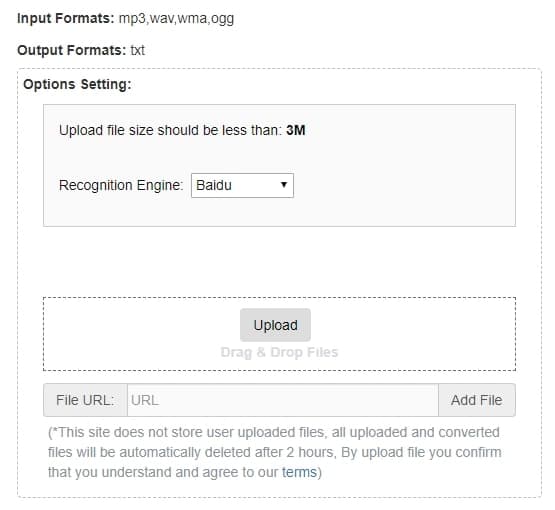
The Bear file provides premium features for free. It gives maximum features that you will not get in any listed apps. Along with voice-to-text, you can also convert various files to another format, such as PPT to JPG, PPT to PDF, and so on.
Bear File Converter
It is the hub to convert anything; if you are looking for an app for multiple conversions, it will be best for you. You can share your prepared file for various platforms. The interface of this app is simple; you can quickly proceed with any features. The app uses Baidu as a speech identification engine. It is the perfect multimedia converter for any file.
Visit Bear File Converter
5. Sonix
It is the fastest app to convert voice recordings to text messages compared to other listed apps. It is for the user who needs a quick and reliable app to convert their recording to messages.
Sonix
This app’s accuracy is quite high, which means it will probably get the correct output without any errors. You can also highlight the essential terms of your file. The app will help you in managing hard volume files, but the app is not free.
However, you can give it a try by using their 30-minute free trial, which is surely going to impress you. It also has a custom dictionary where you can add essential words. Along with it, you will also get a multi-user access feature, which means multiple members can handle the files.
Visit Sonix
