Google has released the Android 12 Developer Preview 2 this week, including several features to ease and better your experience. These include one-handed mode, a new gray theme, unbridging apps from notifications listening, swiping for the notification panel, and a new widget picker. Here’s all about them;
Android 12 Developer Preview 2 Features
The next iteration of Android for smartphones is getting significant changes to soothe our experience. While most of what we’ve heard till now are just leaks, some are released officially by Google in its developer preview 2.
One-Handed Mode
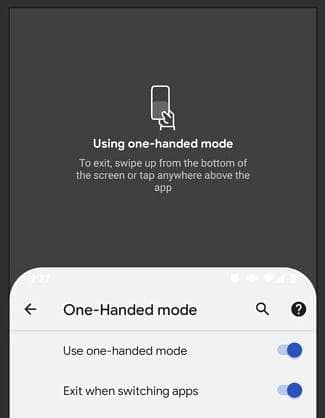
This is pretty helpful, especially in smartphone OEMs racing to increase the screen size. While having larger displays come in handy for video streaming, navigating through apps and features is often hard on them. Thus, the new one-handed mode in Android 12 will shrink the display’s size to three-fourths to the bottom, which is then easy to use.
Smart Forwarding of Calls
Android 12 users can now direct the system to forward calls from one SIM to another in the same handset. This is to reach the caller by receiving calls to SIM 2 if SIM 1 is unreachable.
Notification Swiping Gesture
I found another gesture – swipe down for notifications. You know how the Pixel Launcher lets you swipe down on the home screen to pull down the notification shade? Yeah, this does that – but in any app. pic.twitter.com/VpmRESJkkM — Mishaal Rahman (@MishaalRahman) February 19, 2021
