Google has brought a new feature to its Message App, where all the users can schedule messages. This feature is rolling out for some of the users, and soon it will be available for all the users.
Schedule Messages on Google Message App
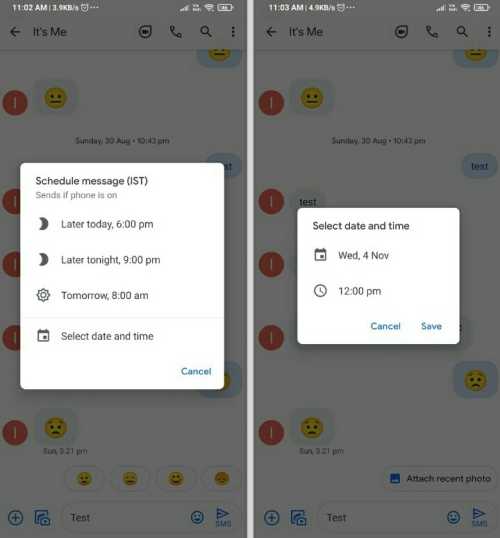
One of the Twitter users @besaireddy spotted this feature and post about it on Twitter. In the post, we can see the screenshots of the scheduling messages feature in Google Messages.
If you want to schedule a message, you have to press and hold the Send button, and then you will see a schedule message option. Once you click on the schedule message option, a pop-up window will be seen with three options from which you can select to send a message on “later today, 6:00 Pm,” “Later tonight, 9:00 PM”, or “Tomorrow, 8:00 AM”.
Finally Google Messages added “Schedule message” ???????? feature. Put some text in draft, tap and hold send button “schedule message” option will popup. Previously used to get and option to add subject for mms now it moved to 3 dot menu @9to5Google @SkylledDev @AndroidPolice pic.twitter.com/iMNoSt3hLu — Sai Reddy (@besaireddy) November 4, 2020
